


Cheops
BUsiness insights modules
Streamline your construction financial management processes with our full suite of construction project financial modules, tailored for businesses and projects of all sizes.
Explore our comprehensive, scalable, and fully integrated software suite, designed to provide the flexibility and efficiency you need to maximise your construction projects.
FULLY INTEGRATED
AUSTRALIAN MADE
MOBILE FRIENDLY
LOCAL SUPPORT
CUSTOMISABLE
CHEOPS Business Analytics
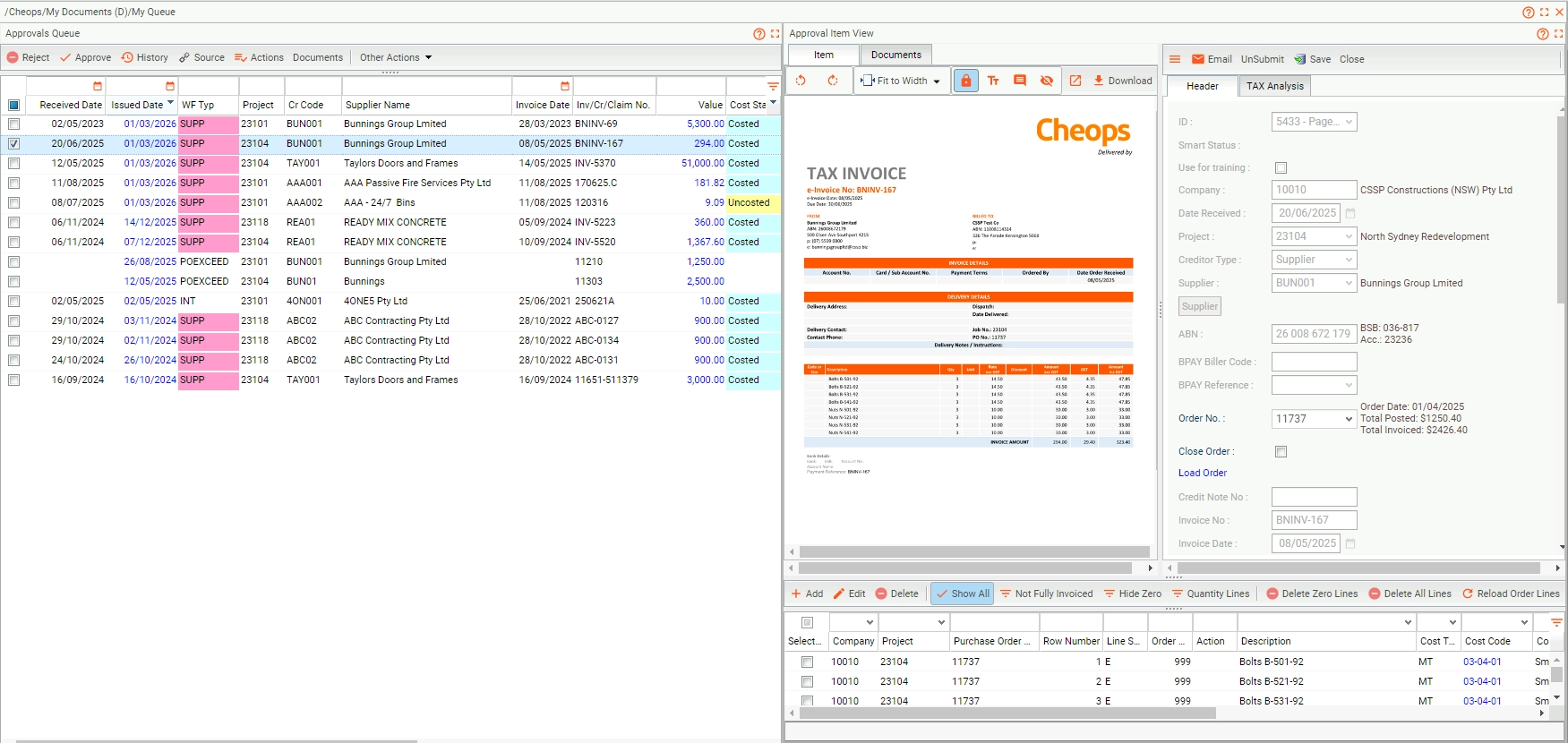
Workflow Approval
Control project approvals with built-in rules and live data transparency.
Manual approvals can delay decisions and increase risk. Cheops Workflow Approval puts structure around critical project and financial processes—so the right people sign off at the right time, every time. Fully integrated into Cheops, it gives you clear visibility into approval status and audit history—no email trails or paper forms required.
Whether you’re approving variations, purchase orders, claims, or budgets, every workflow is backed by live project data and custom business rules to ensure consistent, accountable decision-making
Key Features
- Customisable Approval Paths – Set user- and role-based workflows based on your internal controls.
- Built-In Approvals for Key Processes – Apply structured workflows to claims, POs, variations, invoices, budgets and more.
- Role-Based Visibility – Only authorised users can view, edit, or approve based on assigned permissions.
- Trackable Approval History – View full audit trails including timestamps, approvers, and changes.
- Automated Notifications – Alert users when actions are pending to keep workflows moving.
- Real-Time Integration with Project Financials – All approvals reflect instantly in job costing and reporting.
Business Benefits
- Strengthen Governance – Ensure the right people review and sign off before costs are committed.
- Speed Up Decision-Making – Eliminate delays with structured, digital workflows and automated alerts.
- Increase Transparency – Know where every request sits and who approved what, when.
- Reduce Risk of Overruns – Prevent unauthorised spending or incorrect claims before they hit the ledger.
- Consolidate Admin – Manage all approvals in one system with consistent controls and no paperwork.
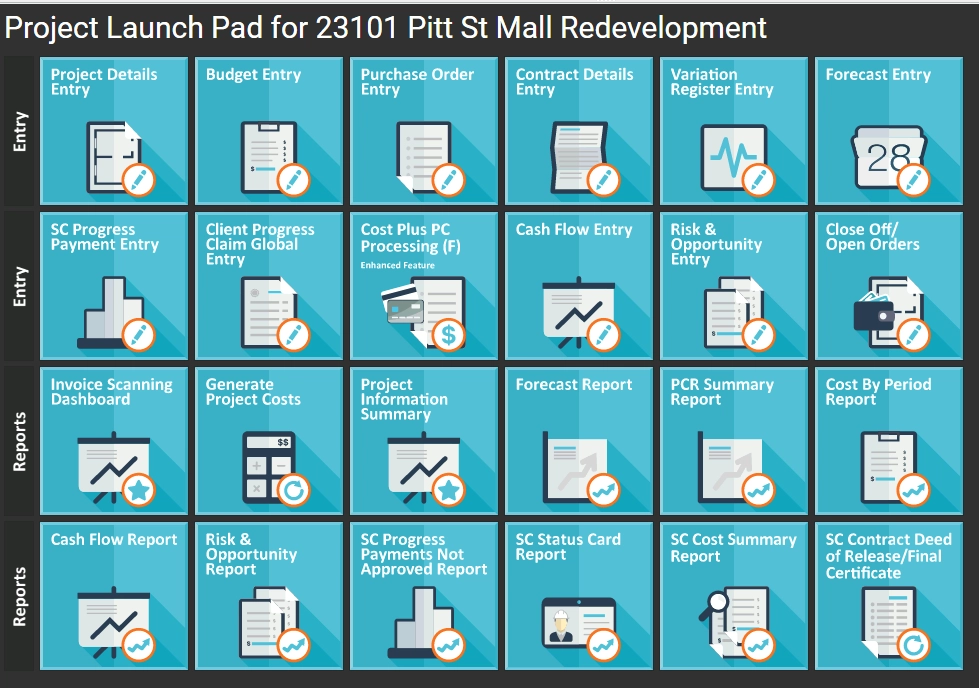
Favourites Launchpad
Quick access to your most-used project tools, your way.
The Cheops Favourites Launchpad gives you personalised, one-click access to your essential functions, so you can jump straight into the tools you use most. No navigating menus or clicking through layers – just faster, smarter access to the daily actions that keep your projects moving.
Whether you’re a Site Manager, Contracts Admin, Project Manager or Financial Controller, the Launchpad adapts to the way you work – saving you time, improving focus, and making Cheops even more intuitive.
Key Features
- Personalised Dashboard: Pin your most-used Cheops functions for instant access.
- One-Click Navigation: Launch key tasks without navigating multiple menus.
- Role-Based Visibility: See the tools that matter to your job – nothing else.
- Customisable Shortcuts: Easily update or reconfigure your favourites as your role evolves.
- Embedded in Cheops: Fully integrated and accessible across the Cheops platform.
Business Benefits
- Save Time Daily: Cut down on repetitive clicks and start tasks faster.
- Work Smarter: Stay focused with only the tools you need, right where you need them.
- Tailored for Your Role: Whether you’re managing budgets or site progress, Launchpad keeps your essentials front and centre.
- Simplifies Training & Onboarding: New team members can find key tools faster with a personalised start screen.
- Fits Your Workflow: Customise as you go – Launchpad evolves with your needs.
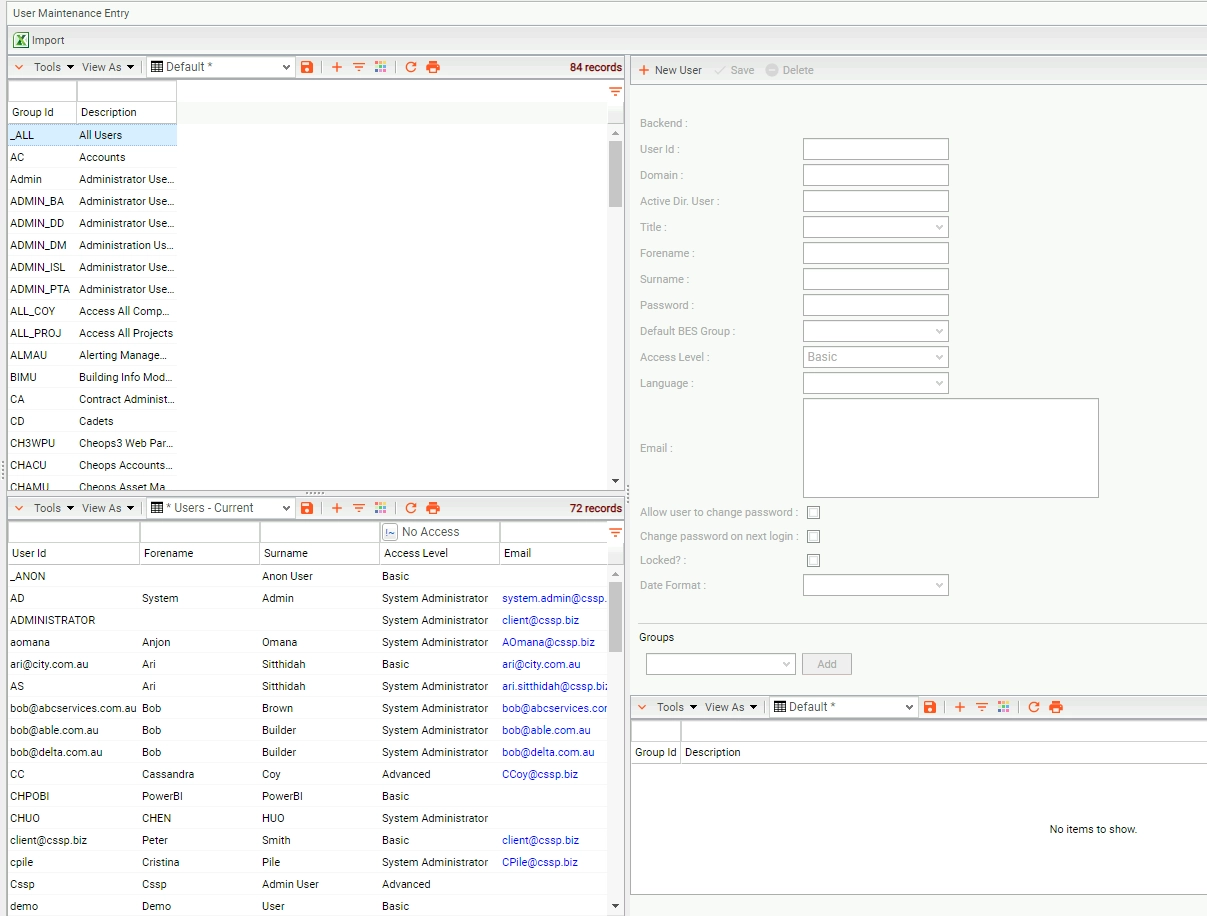
Menu Security
Control access. Protect data. Empower your team.
With the Cheops Menu Security module, you design who sees what—across users, teams, projects or entities—so that your construction business stays secure and efficient. The module allows you to set custom menu access, apply role-based permissions and enforce multi-factor authentication so you keep sensitive project and financial information exactly where it belongs.
Key Features
- Multi-Factor Authentication (MFA) – Require each user to log in with verified credentials for added security.
- Role Based Security – Create user-groups with specific menu access; assign individuals to groups so permissions inherit automatically.
- Custom Access Configuration – Design tailored access for new groups or individual users to match your business or project needs.
Business Benefits
- Strengthen data security – Ensure only the right people access the tools and information they need, reducing risk of accidental or inappropriate data exposure.
- Simplify user management – With groups and inheritance rules, you reduce admin overhead and keep permissions aligned with your structure.
- Support project-specific workflows – Tailor access for site staff, contractors, admin teams or executives to match their role and responsibilities.
- Enhance compliance readiness – Maintain clear records of who accessed what and when, helping with audits and accountability.
- Boost operational efficiency – Reduce clutter and confusion by showing users only the menus and modules relevant to them—so they work smarter.
Request a Demo today to see how Cheops Menu Security gives you precision control over access, strengthens your team’s productivity and safeguards your critical project and financial data.
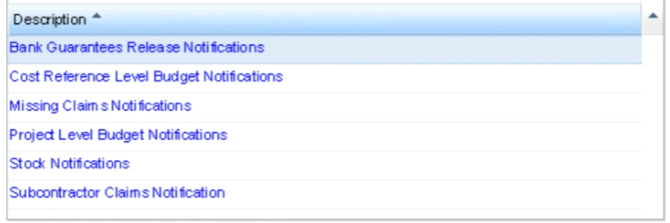
Alerts & Notifications
Stay ahead with automated notifications that keep your projects on track.
In a fast-moving construction environment, it’s easy for critical tasks and deadlines to slip through the cracks. Cheops Alerting helps your team stay proactive with real-time notifications triggered by key financial and project events—so nothing important gets missed.
Whether it’s overdue claims, expiring insurances, or unapproved variations, Alerting ensures the right people are notified at the right time—directly from within Cheops.
Key Features
- Custom Alerts & Notifications – Set alerts for key events like claim deadlines, expiring insurances, or approval hold-ups.
- Multi-Channel Delivery – Send alerts via email, SMS, or within the Cheops dashboard.
- Trigger-Based Logic – Alerts are automatically generated based on real-time system activity.
- Role-Based Targeting – Notify specific users, teams, or roles based on the task.
- Fully Integrated with Cheops – Works across financials, contracts, payroll, compliance, and more.
- Easy Configuration – Set up and adjust alerts without custom development.
Business Benefits
- Reduce Delays – Stay ahead of due dates, compliance issues, and financial risks.
- Support Proactive Management – Act before issues escalate—no more reacting too late.
- Keep Everyone Aligned – Ensure stakeholders are notified when action is needed.
- Improve Compliance – Never miss an insurance, safety, or documentation expiry again.
- Enhance Accountability – Clear notifications help assign responsibility and track follow-through.
Cheops Alerting helps your team act faster, stay compliant, and keep projects moving—without the manual follow-up.
Business Forecasting
Confident decisions backed by real-time financial insight.
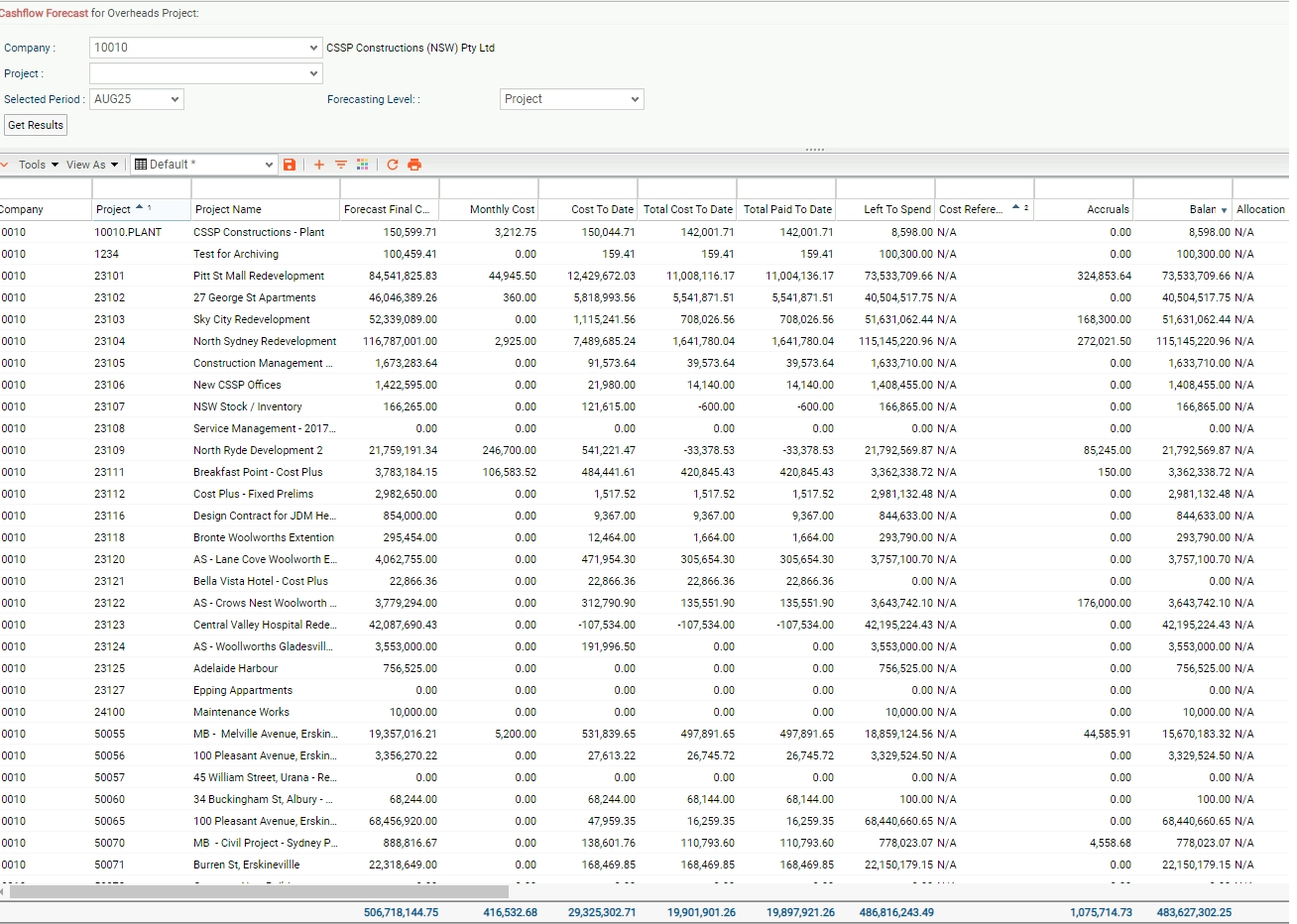
Forecasting shouldn’t be a guessing game. With Cheops Business Forecasting, you gain a live, accurate view of your project and portfolio financials—driven by real-time data from across your Cheops environment.
From the site to the boardroom, Cheops gives decision-makers the visibility they need to stay proactive and in control.
Key Features
- Live Forecasting Tools – Instantly view updated forecasts as costs change.
- Cost-to-Complete Calculations – Auto-calculate future costs based on live data.
- Portfolio-Level Visibility – Consolidate forecasts across projects.
- Drill-Down Reporting – Analyse forecasts at any level.
- Fully Integrated – Connects with job costing, claims, variations and procurement.
- Customisable Forecast Views – Tailor dashboards for different roles.
Business Benefits
- Improve Financial Accuracy – Make decisions using live data.
- Save Time on Reporting – Remove manual updates.
- Stay Ahead of Risk – Identify issues early.
- Align Teams Around One Source of Truth
- Support Executive Insight – Clear visibility into performance.
Make proactive, profit-driven decisions with confidence—powered by Cheops Business Forecasting.
KPI Dashboards
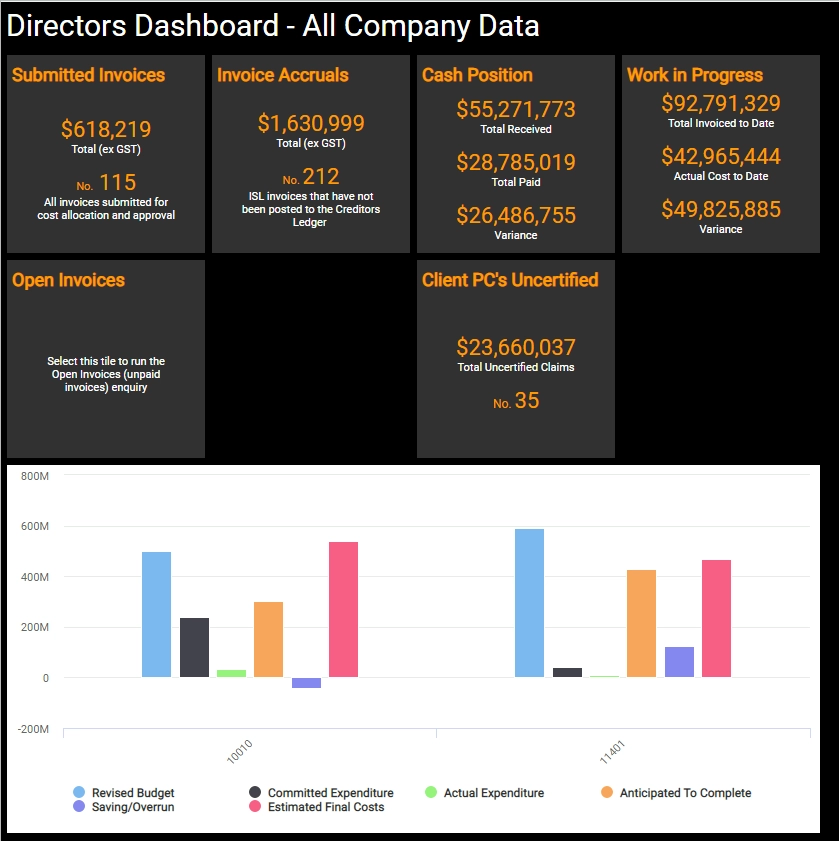
Cheops Business Analytics gives organisations real-time visibility into performance across projects, finance, operations, and corporate functions.
With powerful, role-based dashboards and deep drill-down capability, users can move from high-level KPIs to the underlying data table and documents in just a few clicks.
Key Features
Role-Based ‘Out-of-the-Box’ Dashboards
- Pre-configured dashboards for executives, project managers, finance, commercial, and operations
- Immediate insights without needing to build reports from scratch
- Consistent metrics across the organisation
Build Your Own Dashboards
- Create custom dashboards tailored to your business processes
- Combine data from multiple modules (projects, finance, procurement, Subcontracting, variations, etc.)
- Add custom KPIs, charts, tables, and calculations
Drill-Down to the Data Behind the Numbers
- Click any KPI, chart, or metric to see the underlying transactions
- Drill all the way down to the source document (invoice, variation, timesheet, PO, etc.)
- Instantly validate anomalies, investigate issues, and confirm data accuracy
Advanced Filtering, Sorting & Grouping
- Filter by project, region, cost code, supplier, date range, or user
- Sort and group data to uncover trends and patterns
- Save favourite views for quick access
Custom Calculations & Totals
- Add custom calculation fields (e.g., margin %, cost variance, productivity ratios)
- Display subtotals, grand totals, and conditional formatting
- Tailor metrics to your organisation’s reporting standards
Real-Time Data Refresh
- Dashboards reflect live Cheops data
- No manual exports or spreadsheet manipulation
- Ensures decisions are based on current, accurate information
Create Reports
- Create standard report templates for all departments, projects teams to utilise.
- Consistent Report interface for the whole business.
- Share insights with executives, project teams, or stakeholders
- Supports board reporting, monthly reviews, and project governance
Business Benefits
Faster, More Informed Decision-Making
- Leaders see performance at a glance
- Project teams identify issues before they escalate
- Finance gains clarity on cashflow, commitments, and cost performance
Immediate Visibility Into Anomalies
- Spot unusual trends or outliers instantly
- Drill down to the exact transaction causing the issue
- Reduces time spent investigating discrepancies
Stronger Project Control
- Track cost performance, variations, productivity, and forecasts
- Monitor subcontractor performance and procurement status
- Improves project delivery outcomes
Reduced Reporting Overhead
- Eliminates manual spreadsheets and duplicated effort
- Automated dashboards reduce admin time for PMs and finance teams
- Ensures consistent reporting across the organisation
Better Alignment Across Teams
- Everyone works from the same KPIs and definitions
- Reduces confusion and conflicting reports
- Strengthens governance and accountability
Supports Digital Transformation
- Moves reporting away from static spreadsheets
- Creates a dynamic, data-driven culture
- Scales with organisational growth
Strategic Outcome
Cheops Business Analytics transforms raw data into actionable intelligence – empowering teams to make faster, smarter, and more confident decisions across every level of the organisation.
Custom Reports
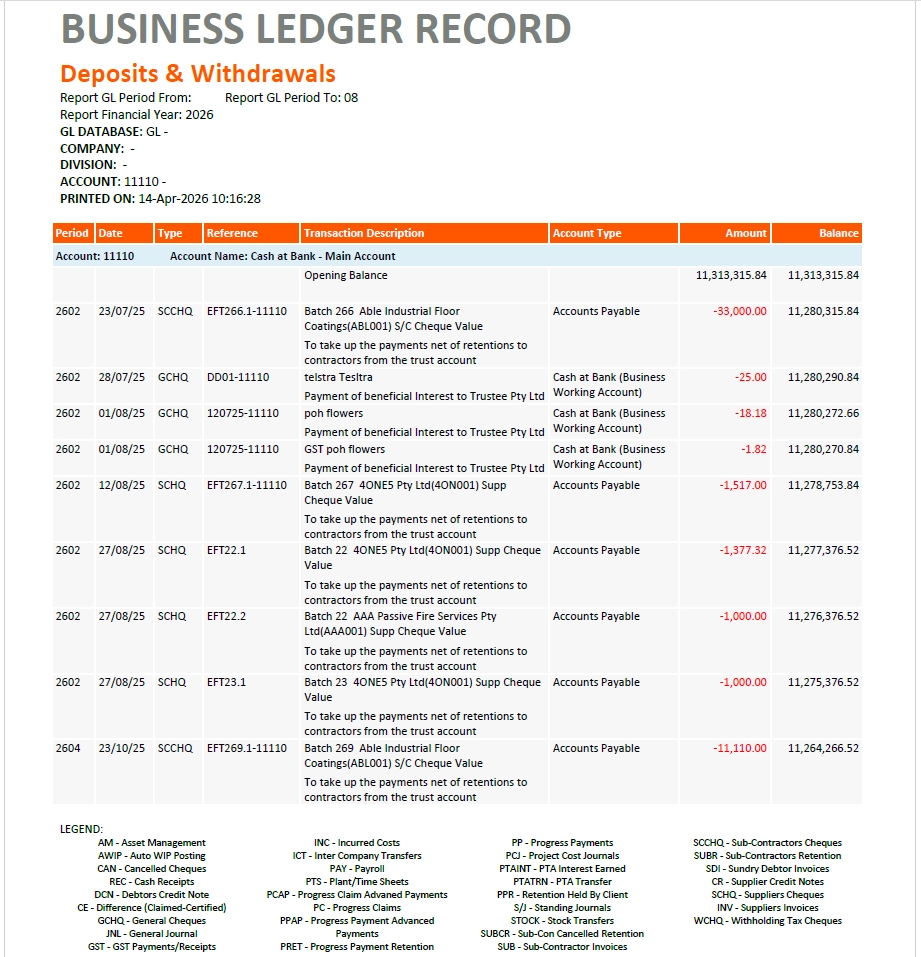
Cheops Custom Reports allow organisations to combine data from multiple Business Analytics enquiry apps and automatically populate pre-formatted, professional report layouts. Stakeholders simply run the report – no spreadsheets, no manual consolidation, no formatting required.
Key Features
Multi-Source Data Integration
- Pulls data from multiple Business Analytics enquiry apps at the same time
- Combines project, financial, procurement, Subcontracting, and operational data into a single report
- Ensures consistency across all reporting outputs
Pre-Formatted Microsoft Word Report Layouts
- Reports are generated directly into structured Word templates, saved as a PDF
- Supports tables, charts, summaries, headers, footers, and corporate branding
- Uses all native Word tools: styles, auto-numbering, indexing, tables of contents, etc.
Auto-Indexing & Structured Output
- Automatically generates tables of contents, section numbering, and index entries
- Ensures long or complex reports remain easy to navigate
- Ideal for board packs, monthly project reviews, and audit documentation
One-Click Execution for End Users
- Stakeholders simply run the report — no technical skills required
- Eliminates manual data extraction and formatting
- Ensures consistent reporting across the entire organisation
Suitable for All Stakeholders
- Executives: high-level summaries and KPIs
- Project teams: detailed cost, progress, and risk reporting
- Finance: commitments, cashflow, accruals, and variance analysis
- Commercial: subcontractor performance, procurement status, variations
Business Benefits
Faster, More Accurate Reporting
- Eliminates manual consolidation of data from multiple systems
- Reduces errors caused by spreadsheets or copy-paste workflows
- Ensures reports are always based on the latest Cheops data
Better Decision-Making
- Combines high-level KPIs with detailed supporting data
- Enables leaders to validate numbers instantly
- Improves confidence in reporting accuracy
Consistency Across the Organisation
- Everyone uses the same report templates and definitions
- Reduces variation in reporting quality and structure
- Strengthens governance and accountability
Reduced Administrative Overhead
- Saves hours of manual formatting, data extraction, and report building
- Frees project managers, finance teams, and administrators to focus on value-adding work
Improved Project Control
- Provides clear visibility of cost, progress, risks, and performance
- Supports monthly reporting cycles, commercial reviews, and board reporting
- Ensures project teams and head office are aligned
Supports Digital Transformation
- Moves reporting away from spreadsheets and manual processes
- Creates a scalable, automated reporting framework
- Future-proofs the organisation with consistent, data-driven insights
Strategic Outcome
Cheops Custom Reports transform complex, multi-source data into polished, professional, and reliable reporting — giving every stakeholder the clarity, confidence, and consistency needed to make informed decisions.
Business Analytics
Real-time insights that drive smarter construction decisions.
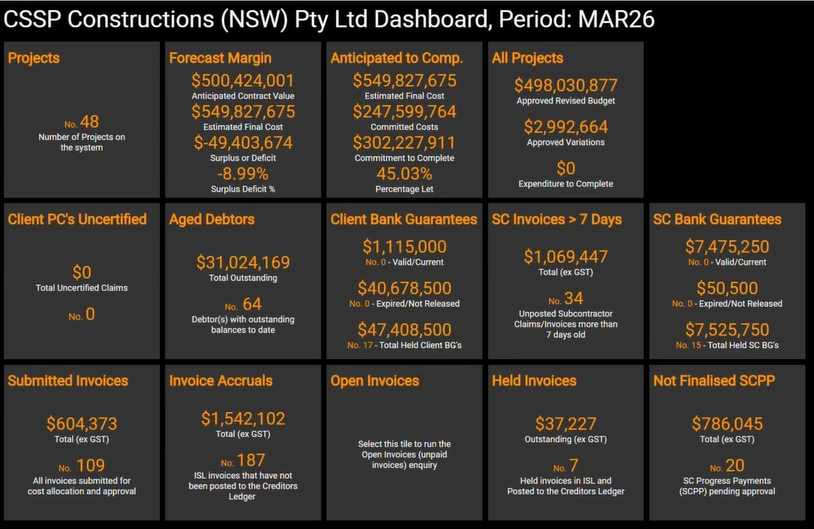
Construction businesses generate vast amounts of data, however without the right tools, it’s difficult to turn that data into meaningful insight. With Cheops Business Analytics, you gain a clear, real-time view of your projects, financials, and performance – so you can make faster, more confident decisions.
From dashboards and KPIs through to detailed reporting, all your data is centralised and accessible in one place. No disconnected systems, no manual spreadsheets – just accurate, actionable insights when you need them.
Key Features
- Customisable Dashboards – Build role-specific dashboards with KPIs, charts, and data views tailored to your business.
- Real-Time Data – Access live project and financial data to stay up to date at all times.
- Unlimited Reporting – Create and generate unlimited reports with flexible formatting and layout options.
- WYSIWYG Reporting – Design reports with intuitive “what you see is what you get” functionality.
- Advanced Word Reporting – Produce professional, fully customised reports in Microsoft Word format.
- Multi-Data Integration – Combine data across projects and systems for deeper, more meaningful insights.
- Flexible General Ledger Views – Display and save your chart of accounts in ways that suit different users and reporting needs.
- Mobile Access – View dashboards and reports anywhere, on any device.
Business Benefits
- Make Faster Decisions – Access clear, real-time insights to act quickly and confidently.
- Improve Visibility – Gain a complete view across projects, financials, and business performance.
- Reduce Risk – Identify trends, issues, and opportunities before they impact your bottom line.
- Save Time on Reporting – Eliminate manual data handling with automated, integrated reporting tools.
- Empower Your Team – Give every role access to the data they need—without complexity.
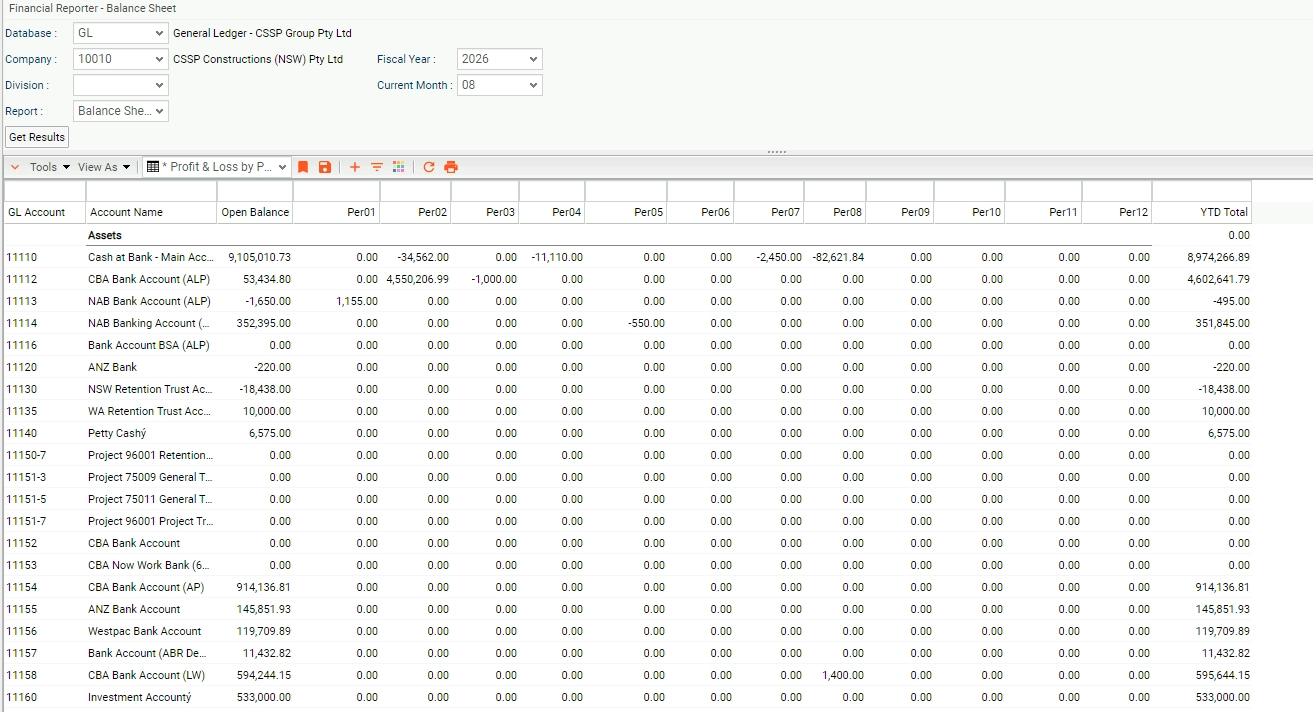
General Ledger Report Writer
The Cheops GL Report Writer gives finance teams complete control over how they view, analyse, and present financial data. It transforms raw ledger information into structured, consistent, and professional on-screen tables and Microsoft Word reports — without relying on spreadsheets or manual formatting. No more exporting to Excel
Key Features
Custom On-Screen Table Views
- Build tailored GL views using filters, groupings, and sorting
- Display account balances, transactions, variances, and period comparisons
- Save custom views for recurring reporting cycles
- Drill into account details and underlying transactions
Flexible Data Manipulation
- Add custom calculations (e.g., margin %, variance %, accrual adjustments)
- Insert subtotals, grand totals, and conditional formatting
- Group by cost centre, project, account category, or period
Multi-Level Drill-Down
- Move from high-level GL summaries to detailed transactions
- Drill all the way down to the originating document (invoice, PO, journal, etc.)
- Ensures transparency and validation of financial data
Microsoft Word Report Generation
- Populate pre-formatted Word templates with GL data
- Supports tables, charts, commentary sections, and corporate branding
- Uses all native Word tools: styles, auto-numbering, headers/footers, TOCs, indexing
- Produces consistent, professional financial reports every time
Controlled & Repeatable Reporting Framework
- Standardised templates ensure consistent reporting across the organisation
- Role-based access ensures only authorised users can modify report structures
- Eliminates version drift and uncontrolled spreadsheet variations
Real-Time Data Refresh
- Reports always reflect the latest Cheops GL data
- No manual exports or offline spreadsheets
- Ensures accuracy for month-end, board packs, and audits
Business Benefits
Faster, More Accurate Financial Reporting
- Reduces manual data manipulation and spreadsheet risk
- Ensures numbers are always current and consistent
- Speeds up month-end, forecasting, and board reporting cycles
Full Transparency & Auditability
- Drill-down capability provides complete traceability
- Supports internal and external audit requirements
- Reduces time spent validating figures or investigating anomalies
Better Financial Insight
- Custom views highlight trends, variances, and performance drivers
- Enables deeper analysis without exporting data
- Supports proactive financial management
Consistency Across All Stakeholders
- Everyone uses the same report templates and definitions
- Eliminates conflicting versions of financial reports
- Strengthens governance and financial control
Reduced Administrative Overhead
- Less time spent formatting reports or reconciling spreadsheets
- Finance teams can focus on analysis, not data wrangling
- Improves productivity across the finance function
Supports Digital Transformation
- Moves financial reporting into a controlled, automated environment
- Reduces reliance on manual spreadsheets and legacy processes
- Creates a scalable, future-proof reporting framework
The Cheops GL Report Writer delivers a controlled, consistent, and highly flexible financial reporting environment – empowering finance teams to produce accurate, professional, and insightful reports with minimal effort.
Construction Management Software That Works With Your Business
Empower your business with software that adapts to your business, grows as you grow, and flexes with your unique business and project requirements.
100% customisable, 100% integrated. No plugins or extensions.
Take a Look at Cheops
See the simplicity and ease of the Cheops interface, with industry-relevant workflows and terminology, and a user-friendly design.
If you would like a more indepth preview of Cheops software, request a free demo by clicking the button below or contact us with any questions.
WORK WITH THE BEST









COUNTRIES
CLIENTS
LICENCES
YEARS IN BUSINESS
CUSTOMER STORY
Sue Souvleris
Dynamic Project Management and Prestige Joinery

Take the first step towards more efficient and profitable projects
Discover how Cheops Construction Management Software gives you total control of project costs, seamless compliance with industry regulations, and real-time visibility across every job.
Request a demo today and see how Cheops brings clarity, confidence, and efficiency to your construction business.